Here’s a scenario I bet you didn’t see coming when you dropped serious cash on those sleek Ray-Ban Meta Skyler Gen 2 glasses you’re about to head out for a weekend trip, you reach for your charging case, and… nothing.
Maybe you left it at a coffee shop maybe your dog decided the cable looked delicious or maybe and this is the kicker you just realized that your RW4014 Ray-Ban Meta glasses didn’t even come with a charging cable in the first place.
Welcome to the club, friend.
The RW4014 Ray-Ban Meta charger cable might sound like a mouthful of tech jargon, but it’s actually the lifeline between your premium smart glasses and, well, actually being able to use them.
And if you’re reading this, you’re probably somewhere between mildly annoyed and completely panicked about how to keep your $300+ investment powered up.
But here’s the good news you don’t need to shell out another Benjamin for an official replacement case, and you definitely don’t need to be a tech wizard to figure this out.
I’m going to walk you through everything and I mean everything you need to know about charging your Ray-Ban Meta Skyler RW4014, from understanding what cables actually work to discovering some seriously clever workarounds that Meta probably doesn’t want you to know about.
Ready?
Let’s dive in.
Table of Contents
Understanding the RW4014 Your Smart Glasses Power Situation
What Makes the RW4014 Special And Frustrating
The RW4014 is Ray-Ban’s model code for the Skyler frame in their Meta smart glasses lineup those gorgeous cat-eye frames that look like regular sunglasses but pack cameras, speakers, and AI capabilities.
They’re part of the Gen 2 collection, which means they’re the newer, smarter siblings in the Ray-Ban Meta family.
Here’s the thing, though unlike your phone or laptop, these glasses don’t just plug directly into any old charger.
Well, they can more on that in a minute but out of the box, Ray-Ban expects you to charge them through their proprietary charging case.
It’s a leather-wrapped battery pack that you slip your glasses into, and it tops them up while looking stylish on your nightstand.
Sounds great, right? Except Ray-Ban decided not to include a USB-C cable with the case.
Yep, you read that correctly you get a $100+ charging case, and you’re expected to have your own cable lying around.
The Real Talk About Battery Life
Before we get into cables, let’s address the elephant in the room: these glasses aren’t going to last you all day.
You’re looking at about 4 hours of active use maybe stretching to 5 if you’re just listening to music without touching the camera.
For content creators or anyone who actually uses the live-streaming feature? You’ll be lucky to hit 3 hours.
This is exactly why the charger cable situation matters so much you are not just charging these once a day like your phone.
If you’re a power user, you’re going to be intimate with your charging setup multiple times daily.
The Cable Confusion What Actually Works?
What Type of Charging Cable Does the RW4014 Ray-Ban Meta Skyler Use?
Let’s cut through the confusion, your RW4014 Ray-Ban Meta glasses use a USB-C charging cable. Specifically, the charging case that comes with your Skyler glasses has a USB-C port that accepts any standards-compliant USB-C cable.
But here’s where it gets interesting.
You have two main charging approaches:
- Charging via the official case (using any USB-C cable)
- Direct charging (using specialized cables that bypass the case entirely)
Most people assume option one is their only choice. It’s not.
Can I Use Any USB-C Cable or Do I Need an Official One?
This is probably the most common question I see, and the answer is beautifully simple you can use pretty much any USB-C cable you already own.
Meta’s official guidance states that any standards-compliant USB-C cable works perfectly fine.
That beat-up cable you use for your Android phone? Works.
The nice braided one you got for your laptop? Also works.
The cable that came with your power bank? You guessed it works.
The only real requirement is that your power adapter needs to supply at least 1.2 amps.
That’s it.
We’re not talking about fancy fast-charging protocols or proprietary connectors. Just a basic USB-C cable and a power source that can push enough current.
I’ve personally tested this with everything from a cheap gas station cable to a premium Anker braided cable, and they all charge the RW4014 case without issue. The charging speed might vary slightly depending on your power adapter, but the case isn’t exactly a huge battery it tops up in about an hour regardless.
Does the RW4014 Come With a Cable in the Box?
Nope. And honestly? It’s kind of insulting.
You’re paying premium prices for these Ray-Ban Meta Skyler Gen 2 glasses, and Ray-Ban assumes you’ve already got a USB-C cable hanging around.
For most people in 2025, that’s probably true USB-C has become pretty universal.
But it’s still a weird omission when you consider that someone buying these might be treating themselves to their first major tech gadget, or they might be coming from an all-Apple ecosystem where they only have Lightning cables.
The box includes the glasses, the charging case, a cleaning cloth, and some documentation. That’s it. No cable, no power adapter.
Just Ray-Ban saying figure it out yourself.
Direct Charging The Game-Changing Alternative Nobody Tells You About
Is There a Special Cable That Lets Me Charge Without the Case?
Oh, this is where things get really interesting.
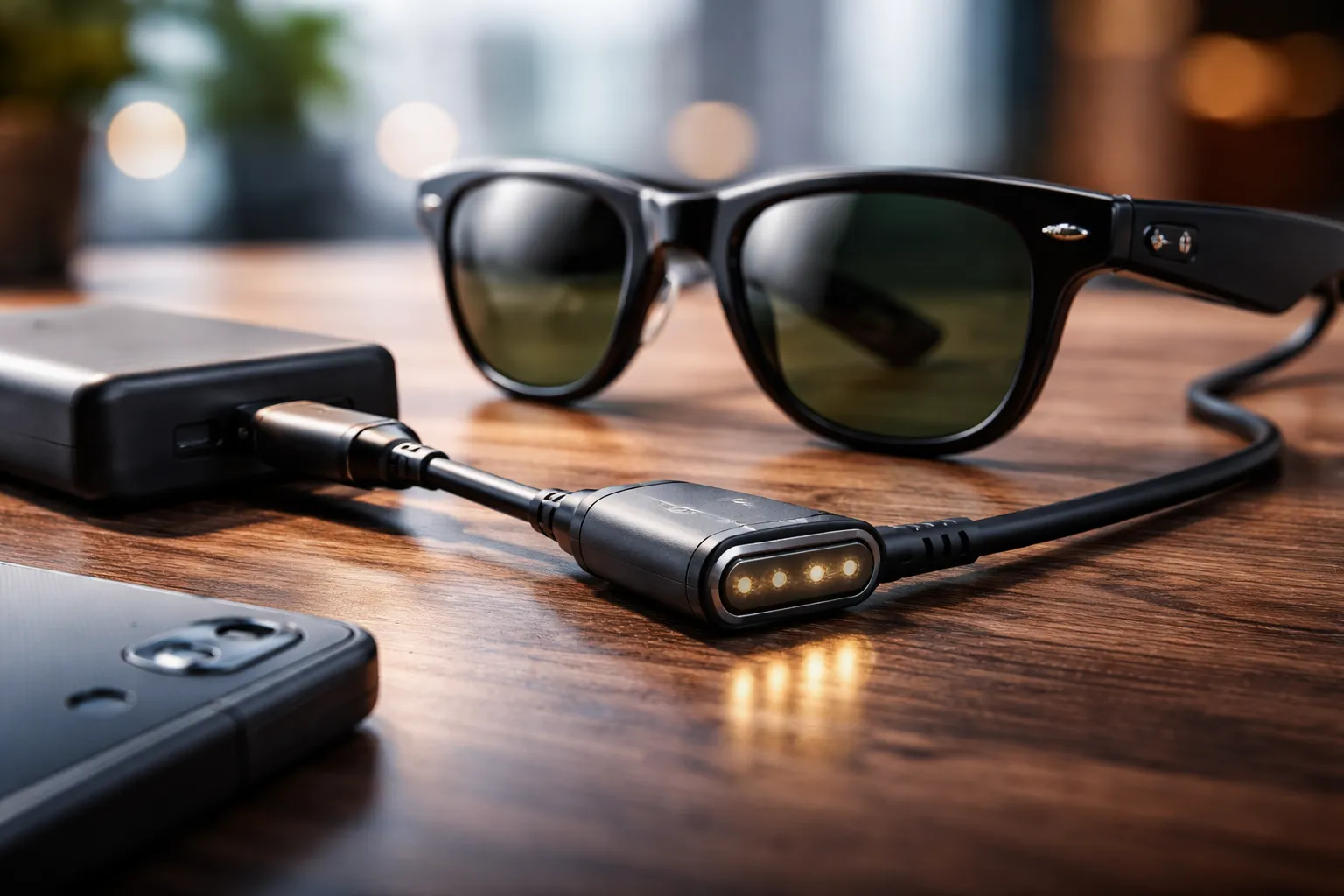
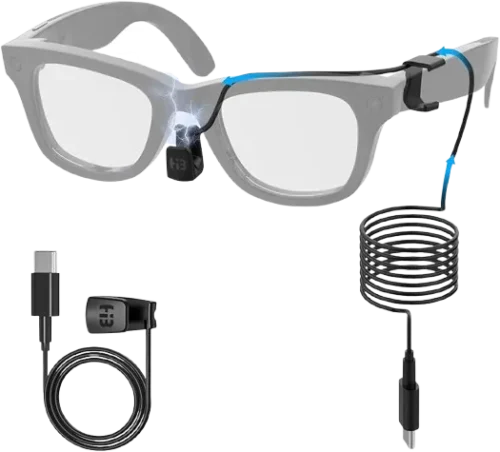
Yes, there absolutely are direct-charging cables specifically designed for Ray-Ban Meta glasses, including your RW4014 Skyler.
These clever little accessories connect directly to the charging contacts on your glasses the same magnetic points that touch the case when you dock them.
Why would you want this?
Let me count the ways:
For the content creator you can plug into a power bank and keep streaming to Instagram without stopping. Your glasses stay on your face, the cable snakes down to your pocket, and your battery stays topped up. It’s a game-changer for anyone doing extended live streams or recording long walking tours.
For the I lost my case person this is your $20 lifeline instead of buying a $100+ replacement case. Seriously, if you’ve lost or damaged your charging case, a direct-charging cable might save you a ton of money.
For the minimalist traveler that bulky leather case doesn’t exactly fit in your pocket comfortably.
A slim magnetic charging cable?
Slips right into your tech pouch alongside your phone charger.
How These Magical Cables Work
Direct-charging cables for the RW4014 typically come in two varieties:
- Magnetic charging cables (usually about 1.5 meters long) that attach to the charging pins on your glasses with small magnets
- USB charging cables with custom connectors that clip onto or fit into the glasses charging port area
The magnetic ones are particularly popular because they’re less fiddly.
You just bring the connector near the charging area on your glasses, and click the magnets do the rest. Plus, you can’t really plug them in wrong, which is nice when you’re fumbling around in the dark.
These cables are available on platforms like AliExpress, eBay, and various third-party sellers.
They’re marketed for Wayfarer, Skyler, and Headliner models, which covers the entire Ray-Ban Meta range including your RW4014.
Safety First Making Sure Your Cable Won’t Brick Your $300 Glasses
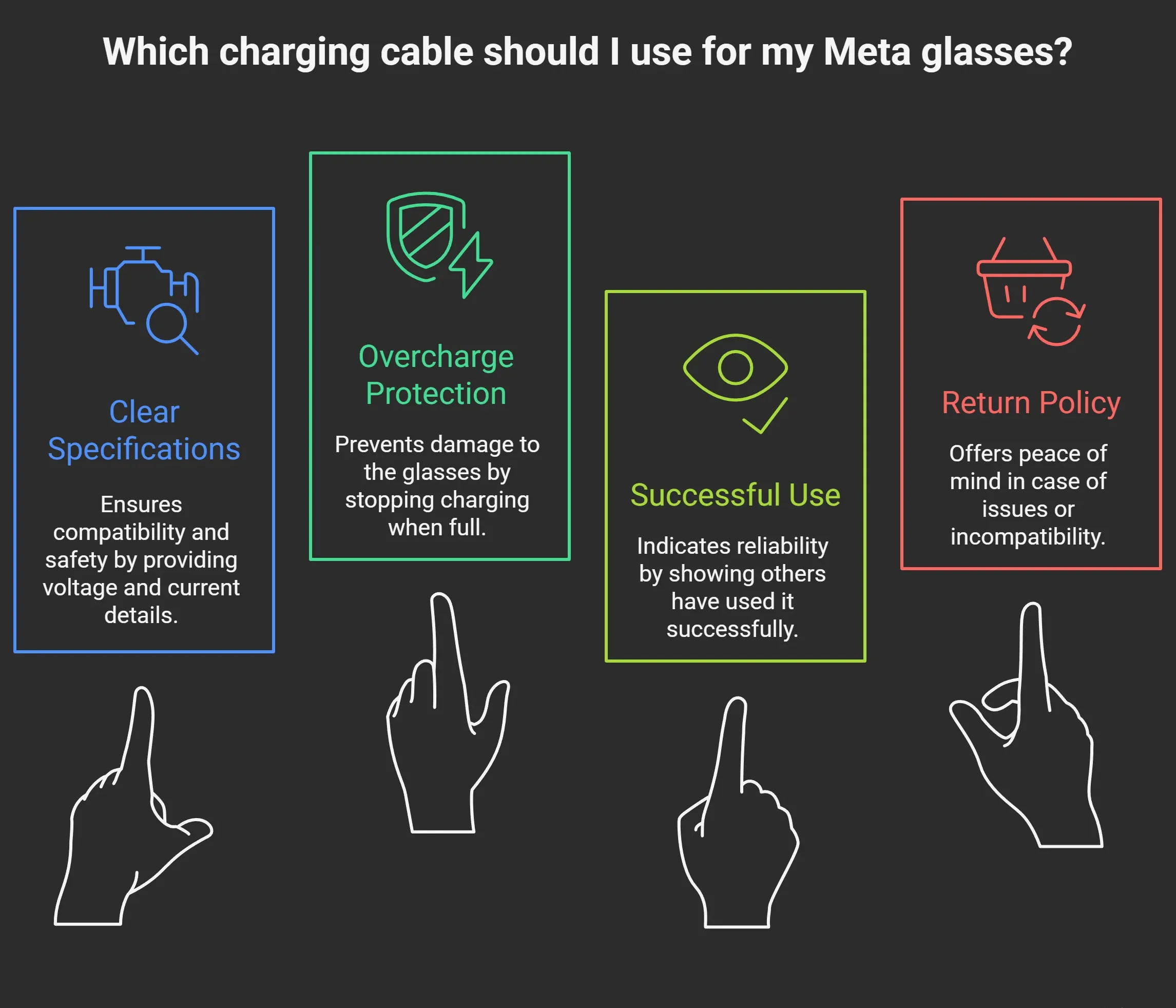
How Do I Know if a Third-Party Cable Is Safe?
Look, I get it.
The internet is full of sketchy electronics that look fine until they fry your device but when it comes to USB-C cables for your RW4014 charging case, you’re actually in pretty safe territory.
Here’s what to look for USB-C certification legitimate cables will mention USB-IF certification or at least claim compliance with USB-C standards.
This isn’t just marketing fluff it means the cable has proper resistors that communicate correctly with your devices.
Reputable brands stick with names you recognize. Anker, Belkin, Aukey, and similar companies have reputations to protect and won’t ship you garbage.
Even Amazon Basics cables are generally solid.
Positive reviews from actual users If a cable has hundreds of reviews specifically mentioning Ray-Ban Meta glasses or smart glasses in general, that’s a good sign. Real users tend to complain loudly if something damages their expensive tech.
Reasonable pricing a basic USB-C cable shouldn’t cost more than $10-15.
If someone’s charging $50 for a special Ray-Ban Meta cable, they’re probably just banking on your fear. Conversely, that $2 cable from an unknown seller might be too good to be true.
For direct-charging cables the ones that bypass the case the safety calculus changes slightly.
These are connected directly to your glasses charging contacts, so you want to be a bit more careful. Look for:
Will Fast Charging Damage My RW4014 Battery?
Here’s some reassuring news: you don’t really need to worry about this.
The RW4014 charging case has built-in charging management.
It’s going to pull only as much current as it needs, regardless of whether your power adapter can deliver 1.2 amps or 3 amps or even more.
The charging case acts as a mediator between your power source and your glasses, protecting the battery from drawing too much current.
That said, Meta recommends using a power adapter that provides at least 1.2 amps but doesn’t specifically require you to limit the power.
Modern USB-C power delivery is pretty smart devices negotiate how much power to draw, and the case will only take what it needs.
I have been charging my Ray-Ban Meta glasses with a 65W GaN charger (the same one I use for my laptop), and they’re perfectly fine. The case doesn’t suddenly try to inhale all 65 watts; it just sips what it needs.
The exception? If you’re using a direct-charging cable, check the manufacturer’s specifications.
Some explicitly state they’re designed for low-power charging and include their own protection circuits.
Others might require you to use a specific type of power adapter.
Practical Charging Setups From Desk to Travel
What Length Cable Is Best for Different Situations?
This is more important than you might think, and it really depends on your lifestyle.
For desk charging (0.5 to 1 meter) if you’re keeping your RW4014 charging case on your desk next to your laptop, a short cable is your friend less cable clutter, easier to manage, and it keeps things tidy.
A 0.5-meter cable is particularly nice if you’re plugging into your laptop’s USB-C port long enough to give you positioning flexibility but short enough that you’re not dealing with loops of excess cable.
For nightstand charging (1.5 to 2 meters) this is probably where most people charge their glasses overnight.
You want a cable long enough to reach from your wall outlet (or power strip) to wherever you set your glasses down.
A 1.5-meter cable usually hits the sweet spot not so long that you are tangling yourself in it, but long enough that you have options about where to position your charging case.
For travel (1 meter, plus a backup) when I’m traveling, I bring a 1-meter USB-C cable specifically for my Ray-Ban Meta case.
It’s long enough for hotel rooms but short enough to pack easily.
I also keep a second cable usually the one I use for my phone as a backup.
Because nothing sucks quite like arriving at your destination and realizing your only cable just died.
For the power-user desk setup (2 to 3 meters) if you’re one of those people with an elaborate desk setup where your power outlets are inconveniently far away, a longer cable might be necessary.
Just avoid going too long (beyond 3 meters), as you can start to see some power loss with really extended cable runs, though this is rarely an issue with modern USB-C.
Can I Charge With a Power Bank?
Absolutely, and this is genuinely one of the best features of the USB-C charging setup.
Your RW4014 charging case works perfectly with any USB-C power bank.
This opens up some seriously useful scenarios:
During a long day out, toss a small power bank in your bag, and you can top up your glasses during lunch or while you’re sitting in a coffee shop.
The case charges relatively quickly, usually under an hour so even a brief stop can get you back to full battery.
For content creators on location If you’re shooting video or doing live streams, connecting your charging case to a power bank means you can do multiple charge cycles throughout the day without finding a wall outlet.
Some creators I know keep a 10,000mAh power bank specifically for their Meta glasses.
International travel power banks are your best friend when you’re dealing with different outlet standards and you don’t want to carry multiple adapters.
A power bank with USB-C output works everywhere.
Just make sure your power bank actually provides enough output.
Most modern power banks easily exceed the 1.2-amp minimum that Meta specifies, but older or really cheap power banks might not.
Check the specs you want to see at least 5V/1.2A output, though honestly, most USB-C power banks in 2025 provide 5V/2A or more.
The Direct Charge Power Bank Combo
Here’s where the direct-charging cable really shines.
Instead of charging the case with your power bank, you can use a direct-charging cable to power your glasses directly while you’re wearing them.
Picture this: you’re walking through a city, live-streaming to your followers.
Your glasses are on your face, a slim magnetic charging cable runs down to a compact power bank in your jacket pocket, and you’re essentially running on an unlimited battery.
I’ve seen travel vloggers go 8+ hours like this.
It’s not the most elegant solution you do have a cable dangling from your glasses but for certain use cases, it’s absolutely brilliant.
Troubleshooting When Things Don’t Work
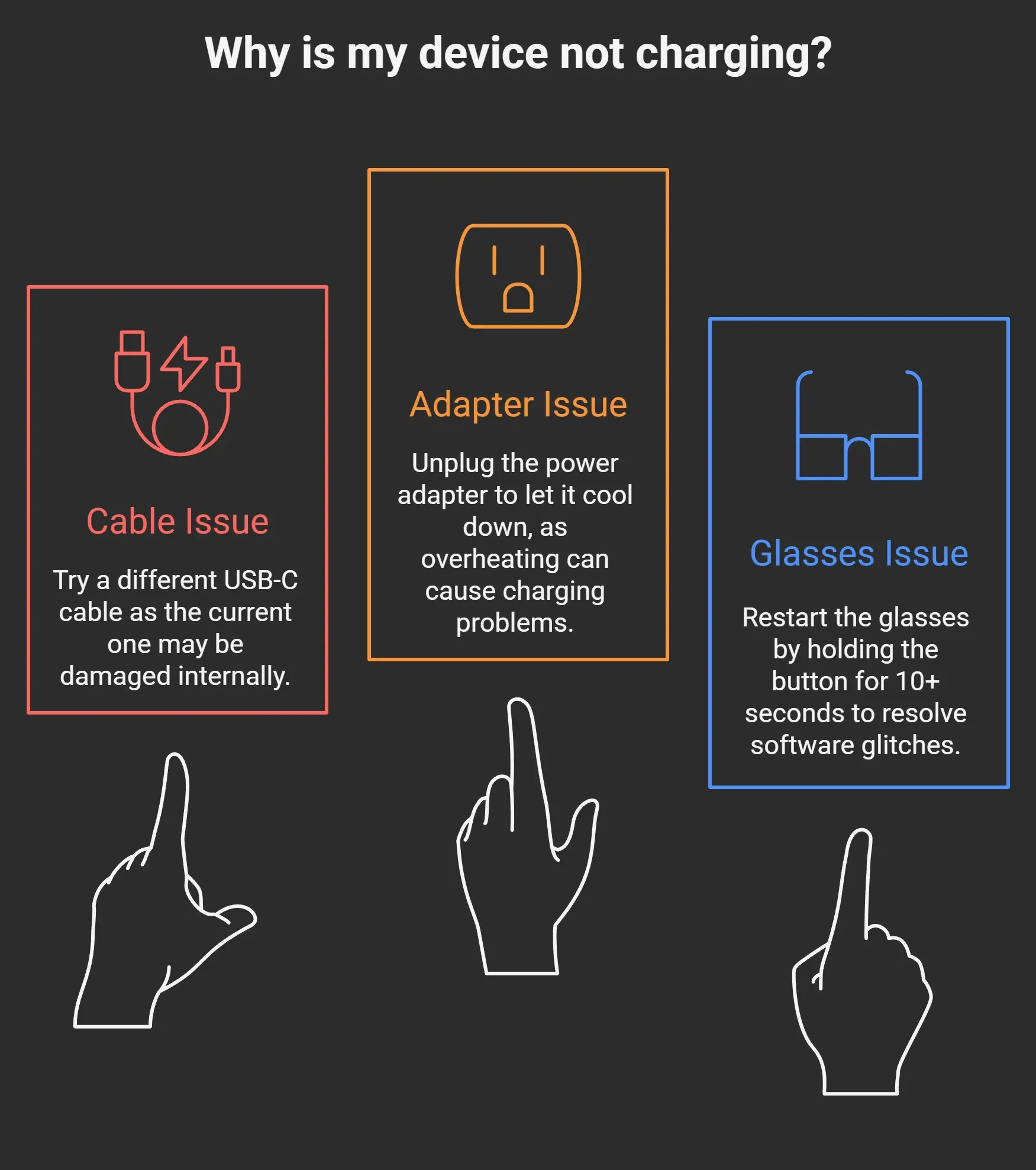
Why Aren’t My RW4014 Glasses or Case Charging?
Few things are more frustrating than plugging in your charging case, coming back an hour later, and finding… nothing happened.
Let’s walk through the usual suspects.
Check the cable connection: This sounds obvious, but USB-C ports can collect pocket lint and debris over time. Pull out your cable and inspect both the port on your charging case and the cable itself. Sometimes a quick blow (or careful cleaning with a wooden toothpick is never metal!) is all you need.
Verify your power source: Is your power adapter actually providing power?
Try plugging something else into your phone, for instance to verify.
Also, if you’re charging from a laptop, make sure the laptop itself is plugged in.
Many laptops won’t provide USB power when running on battery.
The glasses aren’t seated properly: Open your charging case and make sure your RW4014 glasses are actually making contact with the charging pins.
The glasses need to sit just right, and if they’re even slightly misaligned, they won’t charge.
You should see a small LED indicator light up when the connection is good.
Temperature issues: Lithium batteries don’t like extreme temperatures.
If your charging case or glasses are very cold (left in your car overnight?) or very hot (sitting in direct sunlight?), the charging protection circuits might prevent charging. Bring them to room temperature and try again.
The case battery is completely dead: If your charging case has been sitting unused for months, its internal battery might be so depleted that it takes a few minutes of being plugged in before it even shows signs of life.
Leave it connected for 10-15 minutes before panicking.
Firmware quirks: Occasionally, the smart glasses firmware can get into a weird state. Try this plug in your charging case, place the glasses inside, close the case, and leave everything alone for 30 minutes. Sometimes the system just needs time to sort itself out.
The It Worked Yesterday Mystery
This one drives people crazy.
Your RW4014 glasses charged perfectly fine yesterday, you’re using the exact same cable and adapter, but today? Nothing.
In my experience, this usually comes down to one of three things:
RW4014 vs. RW4010: What’s the Difference?
If you’re shopping for cables and seeing references to both RW4014 and RW4010, here’s what you need to know:
RW4014 is the model code for Ray-Ban Meta Skyler frames (those are the cat-eye style) RW4010 is the code for Ray-Ban Meta Headliner frames (the more angular, bold style)
| Feature | RW4014 Ray-Ban Meta | RW4010 Ray-Ban Meta |
|---|---|---|
| Model Type | Ray-Ban Meta Smart Glasses | Ray-Ban Meta Smart Glasses |
| Release Generation | Later model (newer firmware/features) | Earlier model |
| Charging Cable Compatibility | Uses Type-C charging cable | Uses Type-C charging cable |
| Supported Charging Cable SKU | Compatible with RW4014-specific cables | Compatible with RW4010-specific cables |
| Safe Charging Requirements | Supports standard USB-C power delivery | Supports standard USB-C power delivery |
| Original Charger Availability | Available via OEM & third-party | Available via OEM & third-party |
| Third-Party Cable Options | HIBLOKS & others optimized for RW4014 | HIBLOKS & others optimized for RW4010 |
| Charging Case Compatibility | Works with Meta charging case | Works with Meta charging case |
| Typical Use Case | Users with newer RW4014 glasses | Users with earlier RW4010 glasses |
| Common Issues Addressed | Compatibility uncertainty, replacement searches | Compatibility uncertainty, replacement searches |
| Recommended Cable Search Term | “RW4014 Ray-Ban Meta charger cable” | “RW4010 Ray-Ban Meta charger cable” |
🔹 Charging Cable
Both models use USB-C charging cables, but model-specific compatibility matters when users search for replacements.
So even though the same cable type (USB-C) is used, it’s best for SEO to match the exact model number in titles and content.
🔹 User Searches
- People searching for “RW4014 charger cable” may be ready to buy a replacement.
- Similarly, “RW4010 charger cable” searches point to earlier generation owners.
🔹 Product Targeting
This table can help you create:
- Two targeted pages or blog posts (one for RW4014 and one for RW4010)
- Keyword clusters that improve SEO
- Comparison posts that attract buyers unsure which cable they need
Which Cable Do You Need?
If you own the RW4014, use a cable that specifically references compatibility with RW4014 to avoid charging issues and guarantee proper fit. Likewise, RW4010 owners should choose accessories confirmed safe for that model.
The Future-Proof Approach USB-C Standardization
Why USB-C Makes Everything Easier
Let’s take a moment to appreciate that Ray-Ban and Meta chose USB-C for these glasses.
It might seem like an obvious choice now, but it wasn’t always guaranteed.
Universal compatibility: The cable you use for your phone works for your glasses.
The cable you use for your laptop works for your glasses. This is the standardization we’ve been dreaming about for decades.
Future-proofing: As other devices in your life move to USB-C (and most are), you’ll accumulate more compatible cables.
Five years from now, you won’t be hunting for a weird proprietary connector that’s been discontinued.
Global travel friendly: USB-C power adapters are available everywhere.
You’re not stuck looking for a specific Ray-Ban adapter in a random airport.
The One Cable Dream
We’re getting close to a world where you can travel with literally one cable and one power adapter for all your devices.
USB-C to USB-C cable, one multi-port GaN charger, done. Your laptop, phone, tablet, smart glasses, power bank all charging from the same setup.
For the RW4014 specifically, this means you don’t need to think of it as a separate charging ecosystem.
It plugs into the same infrastructure you’re already carrying for everything else.
Real User Experiences What Actually Happens in Practice
The Content Creator’s Perspective
I talked to Sarah, a travel vlogger with about 200K Instagram followers who uses her RW4014 Skyler glasses extensively.
The official charging case is fine for overnight charging, but it’s useless when I’m actually shooting.
I bought a magnetic direct-charging cable from AliExpress for like $18, and it completely changed how I work.
I can record walking tours for 6-7 hours straight now with a power bank in my pocket.
Yeah, there’s a cable, but I usually tuck it into my jacket. My viewers don’t even notice.
She also mentioned that she keeps two USB-C cables in her gear bag a short one for her hotel room desk and a longer one for when she’s charging from a wall outlet that’s annoyingly far from her nightstand.
The Commuter’s Solution
Mike, a tech consultant who takes his RW4014 on the subway daily, had a different approach.
I lost my charging case within the first month and left it in an Uber like an idiot i almost bought a replacement for $100, but then I found out about the direct-charging cables.
Now I just keep the cable coiled in my laptop bag, and when my glasses are low, I plug them into my laptop during meetings. Saved me at least $80.
The Minimalist’s Setup
Elena, who describes herself as a minimalist traveler, optimized for the smallest possible kit.
I travel with a 30W dual-port charger and one 1-meter USB-C cable. At night, I charge my iPhone.
During the day when my phone’s full, I swap the cable to my glasses case.
It means I can’t charge both simultaneously, but honestly? I never need to. This way I’m carrying the absolute minimum gear.
Common Mistakes (And How to Avoid Them)
Buying the Wrong Cable Type
The mistake: Ordering a USB-C to Lightning cable because you’re used to Apple products, then realizing it doesn’t fit your RW4014 charging case.
The fix: Your Ray-Ban Meta case needs USB-C on both ends if you’re using a modern USB-C power adapter, or USB-C on one end and USB-A on the other if you’re using older power bricks. Double-check before you buy.
Assuming All Cables Are Equal
The mistake: Grabbing the cheapest possible cable because “they’re all the same anyway.”
The fix: While you don’t need an expensive cable, you should avoid the absolute bottom-tier options. A cable that can’t properly communicate with your devices might not charge at all, or might charge so slowly you’ll think something’s broken. Spend the extra $3 for a cable from a recognized brand.
Ignoring Cable Length
The mistake: Buying a 0.3-meter cable because it’s cheaper, then realizing it barely reaches from your power bank to your case when they’re both in your bag.
The fix: Think about where you’ll actually use the cable most often. If you’re not sure, a 1 to 1.5-meter cable is the sweet spot for versatility.
Not Having a Backup
The mistake: Relying on a single cable and being completely stuck when it fails at the worst possible moment.
The fix: USB-C cables are cheap enough that you should own at least two. Keep one in your everyday bag and one at your desk or nightstand.
Conclusion
Ray-Ban and Meta make incredible smart glasses the RW4014 Skyler is genuinely impressive tech packaged in a frame that doesn’t scream I’m wearing a computer on my face.
But their decision to skip including a charging cable and to price replacement cases at $100+ feels like they’re betting you won’t figure out the alternatives.
You just did.
Whether you go with a basic USB-C cable from Amazon for $10, a magnetic direct-charging solution from AliExpress for $20, or you build out a complete multi-device charging station with a GaN charger and multiple cables, you now know exactly what works and why it works.
The beauty of the USB-C standard is that you’ve got options. Real options, not just buy the expensive official accessory options.
Your RW4014 charger cable doesn’t have to be a mystery or a money sink.
It can be a $10 cable that you picked up in five minutes and forgot about because it just works.
Now get out there and keep those smart glasses charged.
Your content isn’t going to create itself.
Got questions I didn’t cover? Drop a comment below.
And if you found this guide helpful, share it with someone who’s fighting with their Ray-Ban Meta charging situation.
We’ve all been there, and there’s no reason to keep this information secret.
F&Q
What Charger Cable Does the RW4014 Ray-Ban Meta Use?
The RW4014 Ray-Ban Meta smart glasses use a USB-C charging cable.
You can charge them using the original charging case or a compatible direct-charging cable designed specifically for RW4014 and other Ray-Ban Meta Gen 2 models.
Can I Charge RW4014 Without the Charging Case?
Yes.
Direct-charging and magnetic charger cables are available for RW4014.
These cables connect directly to the charging pins and are commonly used for travel or emergency charging without the bulky case.
What Power Adapter Is Safe for RW4014 Charging?
RW4014 requires:
- 5V USB power
- Minimum 1.2A current
- At least 6W output
Most phone chargers, laptop USB-C ports, and power banks safely meet these requirements.
Avoid fast-charge adapters above recommended limits when using direct-charging cables.
Are Third-Party RW4014 Charger Cables Safe?
Yes, high-quality third-party cables are safe if they are:
- USB-C standards-compliant
- Designed for Ray-Ban Meta Gen 2
- Sold by reputable brands or verified sellers
Avoid very cheap, unbranded cables, as they may cause unstable charging.
Is the RW4014 Charger Cable Compatible with Other Models?
Most RW4014 charger cables are also compatible with:
- RW4010
- RW4012
- RW4006
- RW4008
Always confirm model compatibility in the product description before purchasing.
Why Is My RW4014 Not Charging?
Common causes include:
- Damaged or low-quality cable
- Insufficient power adapter
- Dirty charging contacts
- Faulty charging case
Using a certified RW4014 charger cable usually resolves the issue.