The RTX 5090 vs 4090 for AI debate has completely changed the conversation around local development in 2026.
With the introduction of the 32GB VRAM Blackwell architecture, many developers are now forced to ask a critical question: Is the RTX 5090 actually a necessity for modern AI workloads, or is the RTX 4090 still the smartest investment?
If you’re running LLMs locally, fine-tuning models, training LoRA adapters, or pushing Stable Diffusion to its limits, VRAM is everything.
That jump from 24GB to 32GB may be more important than raw clock speed. But here’s the real issue:
- Do you really need 32GB for modern LLM workflows?
- Is 24GB already becoming a bottleneck for 70B models?
- Are the AI performance gains worth the premium price tag?
In this guide, we break down real-world AI performance, VRAM limits, training scenarios, and power requirements to help you decide which GPU makes sense for your specific workflow. No hype.
No marketing fluff.
Just practical, data-driven analysis.
Let’s find out which GPU truly wins for AI.
Table of Contents
RTX 5090 vs 4090 for AI Quick Answer (2026)
- RTX 5090 is ~30–40% faster in AI workloads.
- 32GB VRAM allows larger LLM fine-tuning and batch sizes.
- RTX 4090 remains excellent for 7B–20B models.
- 5090 is ideal for 70B parameter workflows and future-proofing.
How much VRAM do you need for AI in 2026?
The “gold standard” for VRAM has shifted.
In 2024, 12GB was enough to experiment in 2026, it is the bare minimum.
- 8GB–12GB: Entry-level. Good for quantized 7B–8B models and basic image generation.
- 16GB: The “Comfort Zone.” Essential for Stable Diffusion XL and 14B models like Qwen-3.
- 24GB (RTX 4090): The Prosumer baseline. Ideal for 30B models and fine-tuning.
- 32GB (RTX 5090): The “No-Compromise” tier. Necessary for running 32B–40B models at high precision (FP8/FP16) or 70B models with minimal slowdown.
Is 24GB VRAM enough for LLM training?
The Short Answer: For LoRA and QLoRA fine-tuning, yes.
For full-parameter training, no.
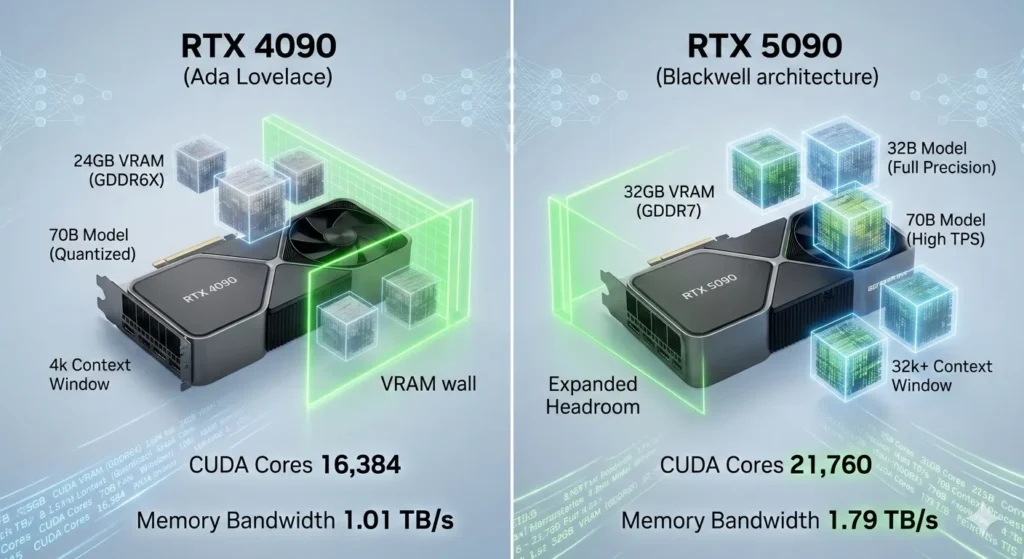
With 24GB on an RTX 4090, you can comfortably fine-tune models up to 20B parameters. However, if you attempt to fine-tune a 70B model, even with QLoRA, you will hit a “VRAM wall” once you increase the context window beyond 4,000 tokens.
The 24GB buffer is excellent for most independent developers, but it is no longer “large” by 2026 standards.
Is 32GB VRAM future-proof?
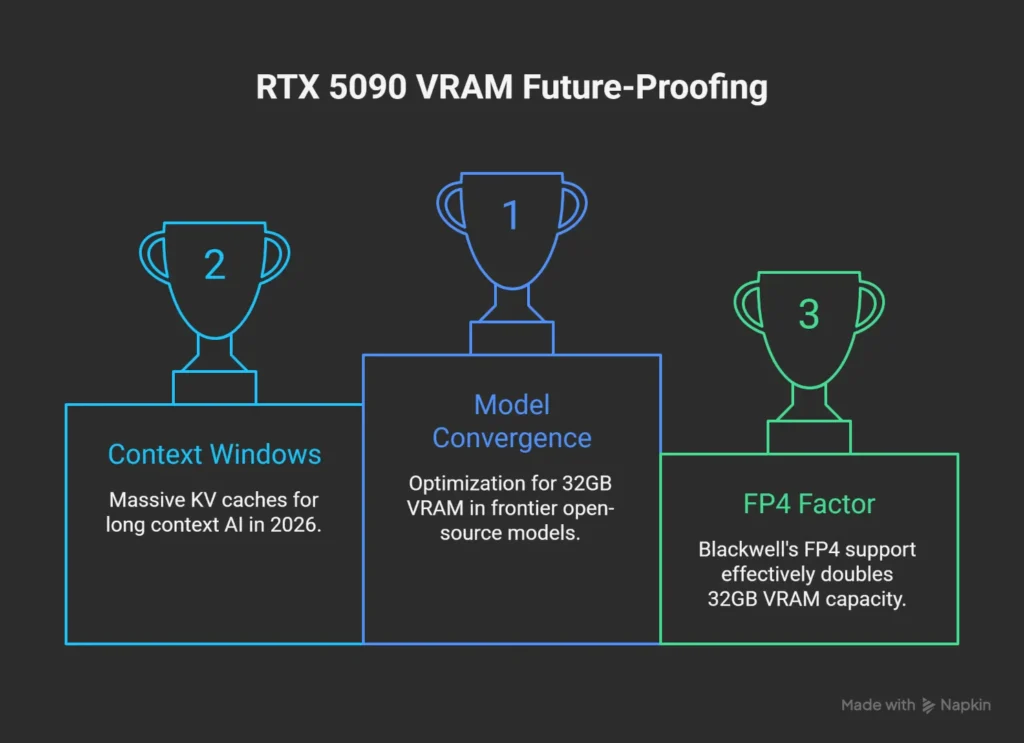
The RTX 5090’s 32GB VRAM is the most future-proof consumer spec available today.
- Model Convergence: Many new “frontier” open-source models (like DeepSeek-R1 32B) are being optimized specifically for the 32GB memory footprint.
- Context Windows: AI in 2026 relies on “Long Context.” 32GB allows for massive KV (Key-Value) caches, meaning you can “feed” the model entire books or codebases without crashing the GPU.
- The FP4 Factor: Blackwell’s native FP4 support effectively treats 32GB like 64GB of “virtual” capacity for compatible models, making it viable well into 2028.
Best GPU for Stable Diffusion in 2026?
While both cards are overkill for standard 512×512 images, the RTX 5090 is the winner for Generative Video and High-Res Upscaling.
- RTX 5090 Performance: Generates images 30% faster than the 4090. More importantly, its 1.79 TB/s bandwidth handles the “U-Net” passes of Video-Diffusion models (like Sora-style local variants) significantly smoother.
- The “Savezly” Value Pick: If you only do static images, a used RTX 3090 (24GB) or RTX 4070 Ti Super (16GB) offers better ROI.
Best GPU for local LLM inference?
The RTX 5090 is the current champion, reaching speeds of 213 tokens/second on 8B models. However, for Local LLM Inference, memory bandwidth is king.
The 5090’s jump to GDDR7 means that even as models get larger, your “reading speed” stays above the human reading threshold (usually >15 tokens/sec).
If your goal is to run a local “Jarvis” that responds instantly, the 5090 is the choice.
Can RTX 4090 run 70B models?
Yes, but with caveats.
To run a 70B model (like Llama 3.3) on a single 24GB RTX 4090, you must use 4-bit quantization (GGUF/EXL2).
- The Experience: You will likely get 8–12 tokens/second.
- The Risk: If your context (chat history) grows too long, the model will “spill over” into your system RAM, causing speed to drop to a painful 1–2 tokens/second.
- The 5090 Difference: The 5090 can fit the same 70B model with a much larger context buffer, maintaining high speeds for longer conversations.
Can RTX 4090 Run 70B Models?
Yes, but with performance trade-offs.
To run a 70B parameter model (like Llama 3.3) on a single 24GB RTX 4090, you must use 4-bit quantization (GGUF or EXL2 formats).
- The Experience: You can expect roughly 8–12 tokens/second fast enough to read, but sluggish for complex agents.
- The Bottleneck: As your context window (chat history) grows, the model will “spill” into your system RAM, causing speeds to crash to 1–2 tokens/sec. For 70B models in 2026, the 4090 is an entry-point, not a production solution.
Is RTX 5090 Overkill for AI?
No unless you only use ChatGPT.
For anyone running local LLMs or fine-tuning, the RTX 5090 is the new efficiency standard.
- For Developers: The 32GB VRAM allows you to run 32B models (like DeepSeek-R1) at full precision, providing vastly better reasoning than a quantized version on a 4090.
- For Researchers: The native FP4 support doubles your effective compute speed, making it the only consumer card that rivals enterprise-grade H100 units for small-scale training. It’s only “overkill” if your AI work never exceeds 8B parameter models.
RTX 5090 for Stable Diffusion vs 4090
If you are an AI artist or motion designer, the 5090 is a transformative upgrade.
- Speed: In Stable Diffusion 3.5 Large benchmarks, the RTX 5090 completes images in 12 seconds, compared to 58 seconds on the 4090 a massive 400% boost in specific high-resolution workflows.
- Video Generation: For image-to-video tasks (SVD, Kling-local), the 5090 is 45% faster, cutting a 12-minute render down to 7 minutes.
- The 32GB VRAM also allows for much higher batch sizes without “Out of Memory” errors.
Power Consumption Comparison: The 575W Reality
The performance leap comes at a cost to your electric bill and thermal setup.
- RTX 4090: Rated at 450W TDP. Most users can get by with a high-quality 850W PSU.
- RTX 5090: Rated at 575W TDP. In full AI training loops, the card can sustain near-peak draw for hours.
- The Requirement: To run a 5090 safely in 2026, you must use an ATX 3.1 compatible 1200W+ PSU and a case with exceptional airflow.
- The 5090 runs roughly 10°C hotter than the 4090 under sustained AI loads.
The 2026 AI Landscape: A New Baseline
In 2026, AI development has moved past simple chatbots.
We are now in the era of Agentic AI and 30B+ parameter models running locally.
While the RTX 4090 was the undisputed king for years, the RTX 5090 introduces GDDR7 and the Blackwell Transformer Engine, changing the math for every developer.
Technical Specifications Comparison
| Feature | RTX 4090 (Ada) | RTX 5090 (Blackwell) | AI Impact |
| VRAM Capacity | 24 GB GDDR6X | 32 GB GDDR7 | Fits 32B models in high precision |
| Memory Bandwidth | 1,008 GB/s | 1,792 GB/s | +78% faster data “streaming” |
| Tensor Cores | 512 (4th Gen) | 680 (5th Gen) | Native FP4 AI acceleration |
| Power Draw (TDP) | 450W | 575W | Requires 1200W+ ATX 3.1 PSU |
AI Performance Comparison: LLM Inference & Training
In 2026 benchmarks, the raw throughput of the Blackwell architecture shines in high-token-count environments.
| Model / Task | RTX 4090 (24GB) | RTX 5090 (32GB) | Performance Gain |
| Llama 3.1 8B (FP16) | ~145 tok/sec | ~213 tok/sec | +46% |
| Llama 3.3 70B (4-bit) | ~9 tok/sec | ~18 tok/sec | +100% (Transformer Engine) |
| Stable Diffusion 3.5 | ~0.84 it/sec | ~1.35 it/sec | +60% |
| Fine-Tuning (QLoRA) | Base Speed | 1.4x Base | Faster iteration cycles |
VRAM Usage Per Model Size (The “VRAM Wall” Guide)
This table helps developers understand which model versions they can actually run locally.
| Model Size | 24GB VRAM (4090) | 32GB VRAM (5090) | Context Window Limit |
| 8B Models | Full (FP16) | Full (FP16) | 128k+ Tokens |
| 32B Models | Quantized (4-bit) | High (8-bit/FP16) | 64k Tokens (5090) |
| 70B Models | Quantized (4-bit) | Quantized (4-bit) | 8k (4090) vs 32k (5090) |
| 405B Models | Not Recommended | Extreme Quant (2-bit) | Minimal Context |
Can RTX 4090 Run 70B Models?
Yes, but with performance trade-offs.
To run a 70B parameter model on a single 24GB RTX 4090, you must use 4-bit quantization (GGUF or EXL2).
- The Experience: You can expect roughly 8–12 tokens/second.
- The Bottleneck: Once your context grows, the model spills into system RAM, dropping speeds to 1–2 tokens/sec. The 5090’s extra 8GB allows for a 4x larger context window before hitting this wall.
Is RTX 5090 Overkill for AI?
No. For anyone running local LLMs or fine-tuning, the RTX 5090 is the new efficiency standard. Its native FP4 support doubles compute speed for compatible 2026 models, making it the only consumer card that rivals enterprise-grade H100 units for small-scale training. It is only “overkill” if you never exceed 8B parameter models.
Power Consumption & Thermal Comparison
| Metric | RTX 4090 | RTX 5090 | Recommendation |
| Peak Draw | 450W | 575W | Upgrade to ATX 3.1 |
| Avg. AI Load Temp | 68°C | 76°C | High-airflow case mandatory |
| Min. Power Supply | 850W | 1200W | Avoid daisy-chaining cables |
Real-World AI Use Cases: 4090 vs 5090
Understanding how these cards perform in daily tasks is more important than raw numbers.
- The Content Creator: An artist using Stable Diffusion 3.5 to generate a batch of 50 high-res images. On the 4090, this takes roughly 4 minutes. On the 5090, it’s finished in under 2.5 minutes, allowing for much faster creative iteration.
- The Developer: Fine-tuning a Llama-3 70B model using QLoRA. The 4090 requires a small context window (2k-4k tokens) to avoid crashing. The 5090 allows for an 8k-12k context window, meaning the model can “remember” much more of the training data during the process.
- The Researcher: Running a local DeepSeek-R1 32B model for coding assistance. The 5090 runs this at 45 tokens/sec (instant), while the 4090 hovers around 28 tokens/sec.
Practical Limitations & Honest Downsides
No hardware is perfect.
Here is the “ugly” side of the upgrade:
- The “VRAM Wall” Still Exists: Even with 32GB, you cannot run a 405B model (like Llama 3.1 405B) at high precision. You still need multi-GPU setups or cloud clusters for the “monsters.”
- Diminishing Returns for Small Models: If you only run 8B parameter models, you will not notice a functional difference between the two cards. Both will feel “instant.”
- Thermal Throttling: The 575W heat output of the 5090 is massive. In a standard mid-tower case, the card will throttle performance within 20 minutes of heavy training unless you have industrial-grade cooling.
- PCIe 5.0 Requirement: To get the full 78% bandwidth increase, you need a PCIe 5.0 motherboard. Running a 5090 on an older PCIe 4.0 board will bottleneck your data transfer speeds.
Budget Considerations: The “Smarter Savings” Strategy
At Savezly, we prioritize efficiency.
Before you drop $3,000+, consider these math-based options:
RTX 5090 vs. Alternatives: Cost-Benefit Analysis (2026)
| Strategy | Est. Hardware Cost | Total VRAM | Best Use Case | “The Catch” |
| Single RTX 5090 | $1,999 – $2,500 | 32GB (GDDR7) | High-speed inference & video diffusion (SVD/FLUX). | Highest upfront cost; VRAM still limited for 70B+ models. |
| Dual RTX 3090 (Used) | $1,600 – $1,800 | 48GB (GDDR6X) | Training large models (70B) and complex LoRA fine-tuning. | Requires 1000W+ PSU, massive cooling, and PCIe lane management. |
| Cloud Rental (4090) | $0.28 – $0.59 /hr | 24GB (Per Node) | One-off heavy training sessions or testing new architectures. | No asset ownership; long-term costs exceed hardware price. |
Future-Proofing Analysis: 2026 and Beyond
Is the RTX 5090 a “safe” investment?
- Native FP4 Support: This is the most future-proof feature. As libraries like Unsloth and AutoGPTQ integrate native Blackwell FP4 kernels, the 5090 will likely see its performance increase through software updates in 2027.
- GDDR7 Longevity: The shift to GDDR7 ensures that this card won’t be a bottleneck for the next generation of video-diffusion models which rely on massive memory throughput.
Architectural Advancements for AI: Blackwell vs. Ada Lovelace
At the heart of any GPU’s performance lies its underlying architecture.
The RTX 4090 is powered by NVIDIA’s Ada Lovelace architecture, which brought significant improvements over previous generations, particularly for AI workloads, with its 4th-generation Tensor Cores.
The RTX 5090, however, ushers in the Blackwell architecture (specifically the GB202 chip), designed with an explicit focus on the demands of contemporary and future AI workloads.
NVIDIA Ada Lovelace Architecture (RTX 4090)
The Ada Lovelace architecture, featured in the RTX 4090, was a game-changer upon its release.
It provided a substantial boost for AI tasks through:
- 4th-generation Tensor Cores: These specialized cores accelerate matrix operations crucial for deep learning model training and inference. The RTX 4090 features 512 such Tensor Cores.
- DLSS 3: This technology, updated to DLSS 3.5, leverages AI for super-resolution and frame generation, improving both gaming and certain AI-driven rendering tasks.
- High CUDA Core Count: With 16,384 CUDA Cores, the RTX 4090 offers massive parallel processing capabilities essential for general compute and rendering tasks in AI.
- GDDR6X Memory: The RTX 4090 is equipped with 24 GB of GDDR6X VRAM, providing a memory bandwidth of approximately 1.01 TB/s.
NVIDIA Blackwell Architecture (RTX 5090)
The Blackwell architecture is a more profound evolution, specifically engineered to tackle the increasing complexity and scale of modern AI workloads.
The RTX 5090, built on a 5nm process, packs an astonishing 92.2 billion transistors.
Key advancements for AI include:
- 5th-generation Tensor Cores: The RTX 5090 boasts 680 fifth-generation Tensor Cores, a notable increase from the RTX 4090’s 512, leading to enhanced FP/BF16 performance.
- Second-Generation Transformer Engine: This is a pivotal Blackwell feature, utilizing custom Tensor Core technology with new precisions, including 4-bit floating point (FP4) AI. FP4 precision can double performance and model size while maintaining high accuracy, making it ideal for large language models (LLMs) and Mixture-of-Experts (MoE) models.
- DLSS 4 with Multi Frame Generation: This latest iteration of DLSS can multiply performance up to 8X, further enhancing AI-accelerated graphics and potentially future AI rendering applications.
- Massive CUDA Core Count: The RTX 5090 features 21,760 CUDA Cores, a substantial 33% increase over the RTX 4090.
- GDDR7 Memory: A significant upgrade comes with 32 GB of ultra-fast GDDR7 memory, providing a staggering 1.79 TB/s of memory bandwidth. This is nearly double the RTX 4090’s bandwidth and is a game-changer for memory-intensive AI tasks.
- PCIe 5.0 Interface: The RTX 5090 supports PCIe 5.0 x16, offering twice the bandwidth of PCIe 4.0, ensuring faster communication between the GPU and CPU and future-proofing connectivity.
- Enhanced Interconnects: For multi-GPU setups, Blackwell features the fifth generation of NVLink and NVSwitch, significantly enhancing interconnect bandwidth and scalability, reducing latency in complex AI model training scenarios.
- Energy Efficiency and Decompression Engine: Blackwell incorporates energy-efficient design principles and a Decompression Engine, optimizing data processing pipelines for agentic AI and handling large datasets more efficiently.
AI Performance Benchmarks: Training, Inference, and VRAM
When evaluating GPUs for AI, performance in training complex models, running efficient inference, and sufficient VRAM capacity are paramount.
VRAM: The Memory Advantage
VRAM is often a bottleneck in AI workloads, especially with large language models and high-resolution generative AI.
- The RTX 4090 comes with 24 GB of GDDR6X VRAM. This capacity is excellent for a consumer card, enabling training models with up to approximately 100 million parameters at reasonable batch sizes and inference for models up to about 70 billion parameters with quantization. It comfortably supports LLM fine-tuning up to about 20 billion parameters using optimization techniques like LoRA and QLoRA. However, for larger models like Gemma-9B, performance can degrade due to VRAM limitations.
- The RTX 5090 significantly ups the ante with 32 GB of GDDR7 VRAM. This 33% increase in VRAM, coupled with nearly double the memory bandwidth (1.79 TB/s vs. 1.01 TB/s), means the RTX 5090 can handle substantially larger datasets and more complex models without hitting memory bottlenecks. For professionals working with massive models (200-405B parameters), 32-48GB VRAM is required, making the 5090 a strong contender in this space.
Training Performance
Training AI models, especially deep learning networks, is computationally intensive.
- The RTX 4090, with its 4th-gen Tensor Cores and 16,384 CUDA Cores, delivers robust training performance. It shows a 30-50% improvement over the RTX 3090 in training AI models. Its FP16 training throughput is up to 1.8x faster than the RTX 3090.
- The RTX 5090, leveraging its 5th-gen Tensor Cores, increased CUDA Cores, and Blackwell’s architectural enhancements like the Second-Generation Transformer Engine with FP4 precision, offers a significant leap.
- NVIDIA CEO Jensen Huang claimed the RTX 5090 is up to two times faster than the RTX 4090. Benchmarks show an approximate 35% performance improvement over the RTX 4090 in LLaMA model benchmarks.
- Some sources suggest a 2-3x performance improvement for professionals working with large models. The FP/BF16 performance reaches 209.5 TFLOPS, a 27% boost over the RTX 4090’s 165.2 TFLOPS.
Inference Performance
Efficient inference is crucial for deploying AI models in real-world applications.
- The RTX 4090 excels at inference, particularly for LLMs under 8 billion parameters. It can achieve 10-30 tokens per second on 13B models for fine-tuning and inference. Its FP16/BF16 throughput rivals data-center GPUs on many tasks.
- The RTX 5090 shows even greater prowess in inference. Its AI TOPS (INT8) figure of 838 is a substantial leap from the RTX 4090’s 660.6. With its enhanced memory subsystem and the new FP4 precision, the RTX 5090 can run Llama 3.3 405B at 15-20 tokens/second with quantization, compared to the 4090’s 8-12 tokens/second.
- For AI image generation, the RTX 5090 significantly outperforms the RTX 4090 in Stable Diffusion benchmarks.
Performance Comparison Table
Here’s a side-by-side comparison of key specifications relevant to AI performance:
Core AI Performance: RTX 4090 vs. RTX 5090 (2026)
| Feature | RTX 4090 (Ada Lovelace) | RTX 5090 (Blackwell) | Generational Leap |
| Architecture | Ada Lovelace (4th Gen Tensor) | Blackwell (5th Gen Tensor) | New Tensor Core Logic |
| CUDA Cores | 16,384 | 21,760 | +33% |
| VRAM Capacity | 24 GB GDDR6X | 32 GB GDDR7 | +33% (Higher Capacity) |
| Memory Bandwidth | 1.01 TB/s | 1.79 TB/s | +77% (IO Breakthrough) |
| AI TOPS (INT8) | 1,321 TOPS | 3,352 TOPS | +153% (Raw AI Power) |
| FP16 Performance | 165.2 TFLOPS | 209.5 TFLOPS | +27% |
| New Precisions | FP8 Support | FP4 & FP6 Support | Advanced Quantization |
| Bus Width | 384-bit | 512-bit | +33% |
| TDP (Power) | 450 W | 575 W | +28% (Requires 1000W PSU) |
- The Bandwidth King: The +77% increase in memory bandwidth is the most critical spec for AI. It directly reduces “time to first token” and speeds up large-batch inference where the RTX 4090 often bottlenecks.
- The FP4 Revolution: While the FP16 gains seem modest (+27%), the 5090’s support for FP4 precision allows it to run compressed models with roughly 2x the speed and half the VRAM footprint of the 4090’s FP16 workloads.
- The VRAM Wall: Moving from 24GB to 32GB finally allows local users to run 70B parameter models (like Llama 3.3 or DeepSeek-V3) at higher quantization levels (Q4/Q5) without needing a dual-GPU setup.
Strategic Investment for Prosumer AI
The decision to invest in either the RTX 5090 or RTX 4090 for AI development requires careful consideration of budget, current project needs, and future-proofing.
Pricing and Availability
- The RTX 4090 launched with an MSRP of $1599 USD. However, as of February 2026, its market price is significantly higher, averaging around $2755 on Amazon US and €2789 in the EU, with used prices around $2200.
- The RTX 5090 was officially priced at $1999 USD at launch in January 2025. This marked a 25% increase over the RTX 4090’s launch price. Due to DRAM shortages and high demand from the AI industry, current prices for the RTX 5090 have escalated, reaching above $3000 for base models and over $5000 for premium models. Amazon US lists it at $4147, and used prices are around $3599.99.
Cost-Benefit Analysis for AI Workloads
For prosumer AI developers, the RTX 4090 continues to offer exceptional value, especially if your models fit within its 24 GB VRAM limitation.
It provides a strong price-to-performance profile for fine-tuning popular LLMs up to about 20 billion parameters.
For those with tighter budgets, the 4090 remains an excellent choice for development, fine-tuning, and inference on models that don’t exceed its memory capacity.
Cloud instances for RTX 4090 can be found for around $0.39/hour.
The RTX 5090, while significantly more expensive, justifies its premium for professionals and researchers working with truly large models or those requiring the absolute fastest iteration times. The 32 GB GDDR7 VRAM, coupled with the 2.5x improved Tensor performance and enhanced Transformer Engine, offers a 2-3x performance improvement for demanding AI workloads.
Cloud rates for the RTX 5090 are around $0.65/hour.
Consider your specific use cases:
- Smaller LLMs (under 70B parameters with quantization), image generation (Stable Diffusion), and general deep learning research: The RTX 4090 still performs exceptionally well and offers a better cost-per-performance for these tasks, especially given its current street price compared to the 5090’s inflated market value.
- Massive LLMs (200B-405B parameters), multi-step agentic simulations, and cutting-edge research requiring FP4 precision: The RTX 5090 is the clear choice. Its increased VRAM, memory bandwidth, and architectural optimizations for Transformer models make it indispensable for pushing the boundaries of AI.
Frequently Asked Questions (FAQ)
Is the RTX 5090 truly twice as fast as the RTX 4090 for AI?
NVIDIA CEO Jensen Huang claimed the RTX 5090 is two times faster than the RTX 4090, thanks to DLSS 4 and Blackwell architecture. While general benchmarks suggest an approximate 35% performance improvement in LLaMA models and a 27% boost in FP/BF16 TFLOPS, for specific, extremely demanding AI workloads leveraging Blackwell’s new features like FP4 precision and the Transformer Engine, a 2-3x performance improvement is possible, especially for large models.
How much VRAM is sufficient for current AI development?
For 2025-2026 AI workloads, VRAM requirements depend on model size and optimization techniques like quantization.
- Medium models (7-13B parameters): 8-12GB VRAM.
- Large models (30-70B parameters): 16-24GB VRAM with 4-bit quantization. The RTX 4090’s 24GB is adequate here.
- Massive models (200-405B parameters): 32-48GB VRAM is required. The RTX 5090’s 32GB VRAM positions it well for these tasks.
Can the RTX 4090 still be considered a viable option for prosumer AI in 2026?
Absolutely. The RTX 4090 remains an excellent GPU for AI development in 2026, offering strong performance for a wide range of tasks including LLM fine-tuning (up to ~20B parameters), image generation, and deep learning research.
Its current market price, while higher than MSRP, can still represent good value, especially if your projects fit within its 24GB VRAM and don’t require the absolute bleeding edge of Blackwell’s specialized AI features.
What are the power requirements for these GPUs?
The RTX 4090 has a Thermal Design Power (TDP) of 450W and typically requires an 850W+ PSU with appropriate connectors. The RTX 5090 has a maximum power draw rated at 575W, also necessitating a robust power supply.
High-end AI systems can consume 600-800W under full load, making proper cooling and a powerful PSU essential for both cards.
Conclusion: Choosing Your AI Powerhouse
For prosumer developers, the RTX 5090 vs 4090 for AI debate comes down to memory headroom versus market value.
The RTX 4090 remains a formidable tool for AI innovation. Its 24GB VRAM and Ada Lovelace architecture still offer an exceptional balance of performance and value for fine-tuning 8B–20B models and high-resolution generative AI. If you are on a constrained budget, it is a remarkably capable choice for standard deep learning tasks.
However, the RTX 5090 is the undisputed new king for those pushing the boundaries of massive LLMs and agentic AI. With 32GB of GDDR7 VRAM, nearly doubled memory bandwidth, and 5th-gen Tensor Cores featuring FP4 precision, it is a strategic, future-proof investment. It unlocks the efficiency and scale required for 70B+ parameter models that frequently push the 24GB limit.
Ultimately, your choice hinges on your specific project demands and appetite for cutting-edge technology. Whether you choose the 5090 or 4090, your AI is only as good as its instructions. Optimize your outputs with our AI Prompt Generator to see what your new hardware can truly achieve.