Vast AI vs Lambda Labs (2026): Which GPU Cloud Is Better for AI Workloads?

Why Choosing the Right GPU Cloud Matters
Picking the wrong GPU cloud can quietly kill a project before it ships.
Training a 70B LLM on unreliable infrastructure means wasted hours, corrupted checkpoints, and budget overruns.
Running Stable Diffusion or fine-tuning on an overpriced managed cloud means burning three times more money than you need to.
In 2026, the GPU cloud market is crowded, and the difference between the right and wrong platform is often measured in thousands of dollars.
Two platforms dominate the conversation for developers who want alternatives to hyperscalers: Vast AI and Lambda Labs.
Both offer GPU compute for AI training and inference. But they work in fundamentally different ways, and they’re built for different kinds of users.
In this guide, we break down every dimension that matters: pricing, GPU availability, performance, reliability, and real-world use cases so you can make a confident decision before spending a dollar.
🔗 Also comparing decentralized options? See our deep dive on Vast AI vs RunPod (2026) for another angle on marketplace GPU clouds.

Table of Contents
Vast AI vs Lambda Labs: Quick Comparison Table
Short on time? Here’s the at-a-glance verdict.
| Feature | Vast AI | Lambda Labs | Winner | Notes |
| Starting Price | ~$0.10/hr | ~$0.50/hr | Vast AI | Vast AI cheaper on spot |
| RTX 4090 | ✅ Yes | ❌ Limited | Vast AI | Wide marketplace availability |
| H100 SXM (80GB) | ✅ Yes | ✅ Yes | Lambda | Lambda more consistent |
| A100 80GB | ✅ Yes | ✅ Yes | Lambda | Lambda SLA-backed |
| Ease of Use | ⭐⭐⭐ | ⭐⭐⭐⭐⭐ | Lambda | Lambda simpler for teams |
| Deployment Speed | ~1–2 min | ~3–5 min | Vast AI | Spot instances boot fast |
| Uptime / SLA | ❌ No SLA | ✅ SLA available | Lambda | Lambda more reliable |
| Persistent Storage | ❌ Ephemeral | ✅ NFS volumes | Lambda | Survives instance stop |
| Best For | Budget / hobbyist | Startups / teams | — | Depends on use case |
🔗 For a full market overview including CoreWeave, Paperspace, and hyperscalers, read our Best GPU Cloud Providers for AI in 2026 engineering guide.
Vast AI Overview
What Is Vast AI?
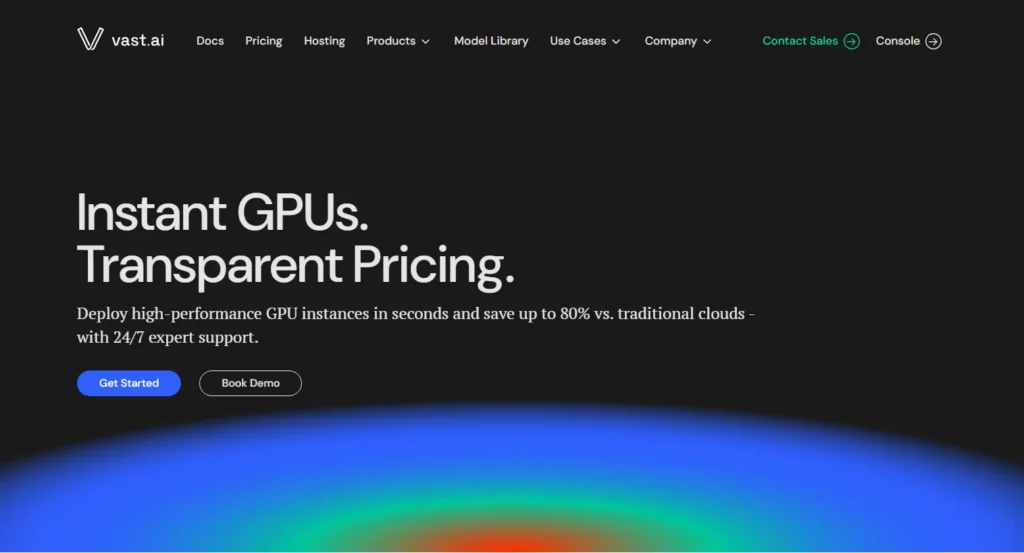
Vast AI is a peer-to-peer GPU rental marketplace launched in 2018.
Rather than owning data centers, Vast AI connects compute buyers with individual hosts, people, and businesses who rent out spare GPU capacity through a centralized bidding platform.
Think of it as the Airbnb of GPU compute.
This decentralized model gives Vast AI an enormous and constantly changing inventory of GPUs at prices that are often 3–5× cheaper than managed cloud providers.
The trade-off is variable quality: host reliability, network speed, and uptime depend entirely on who is running the hardware.
Key Features
- Marketplace-style GPU rental with hundreds of live host listings
- Some of the lowest per-hour GPU prices available anywhere
- Docker-based deployments launch any container image instantly
- Flexible bidding: spot pricing or fixed on-demand listings
- Full SSH access with root control
- Filter by GPU model, VRAM, PCIe bandwidth, host reliability score, and region
- Community reliability ratings and uptime history per host
GPU Types Available on Vast AI
Vast AI has one of the broadest GPU selections on the market:
- Consumer: RTX 3080, RTX 3090, RTX 4090
- Prosumer: A6000, A40, RTX 6000 Ada, L40S
- Data Centre: A100 40GB, A100 80GB, H100 PCIe, H100 SXM
Supply changes in real time as hosts connect and disconnect.
🔗 Deciding between Vast AI and another budget marketplace? Our Vast AI vs RunPod comparison covers both platforms side by side with real workload tests.
Pricing Model
Vast AI uses marketplace pricing.
Hosts set their own rates, and you can bid below list price for spot access.
Spot instances carry interruption risk. On-demand listings are more stable but cost slightly more.
There are no monthly subscriptions, platform fees, or minimum commitments you pay only for active compute time.
🔗 Save more: See our guide on how to cut GPU cloud costs by 40–70% in 2026.
Best Use Cases for Vast AI
- Stable Diffusion, ComfyUI, and image generation workflows
- Budget LLM fine-tuning (7B–30B parameter models)
- Students, researchers, and hobbyists on tight budgets
- Short burst workloads that don’t need continuous uptime
- Rapid prototyping before committing to managed cloud
Lambda Labs Overview
What Is Lambda Labs?
Lambda Labs is a managed GPU cloud provider founded in 2012, originally as a deep learning workstation company. Since 2021, Lambda has focused on cloud GPU infrastructure and built a strong reputation among AI researchers and startups for professional-grade reliability, a clean developer experience, and data center-quality hardware.
Unlike Vast AI, Lambda owns and operates its own infrastructure.
Every instance runs on verified enterprise hardware with consistent networking and formal SLAs.
This makes Lambda a fundamentally different product: not a marketplace, but a managed service.
Key Features
- Fully managed GPU cloud on owned data center infrastructure
- Pre-installed deep learning stack: PyTorch, TensorFlow, CUDA, cuDNN are ready immediately
- Persistent storage volumes: data survives instance termination
- Lambda Cloud API for programmatic instance management
- Team and organisation accounts with role-based access control
- On-demand Jupyter notebooks for interactive development
- 1-click multi-node H100 clusters for distributed training
GPU Types Available on Lambda Labs
Lambda focuses on data center-grade hardware:
- H100 SXM (80GB)
- H100 PCIe (80GB)
- A100 40GB & 80GB
- A10 (24GB)
- RTX 6000 Ada (48GB)
- Multi-node H100 clusters up to 64 GPUs
Consumer GPUs like the RTX 4090 are not offered.
🔗 For a broader view of managed providers, read our Best Managed GPU Cloud Hosting Review 2026 covering 20+ platforms on pricing, performance, and compliance.
Pricing Model
Lambda uses fixed on-demand pricing with no bidding volatility you always know what you’ll pay. Reserved instances are available at discounted rates for 1-year and 3-year terms.
There are no hidden platform fees, and team billing simplifies cost management across engineering organizations.
Best Use Cases for Lambda Labs
- Large-scale LLM pre-training and fine-tuning (30B–70B+ parameters)
- Production ML workloads requiring guaranteed uptime and SLA
- AI startups building and deploying models to production
- Multi-node distributed training with InfiniBand interconnects
- Teams needing shared environments, persistent storage, and access controls
Performance Comparison: Vast AI vs Lambda Labs
Raw GPU performance for a given chip is hardware-fixed an H100 SXM performs identically regardless of platform.
What differs is real-world job completion rate, network throughput, storage I/O, and interconnect quality for distributed workloads.
| Metric | Vast AI | Lambda Labs | Edge |
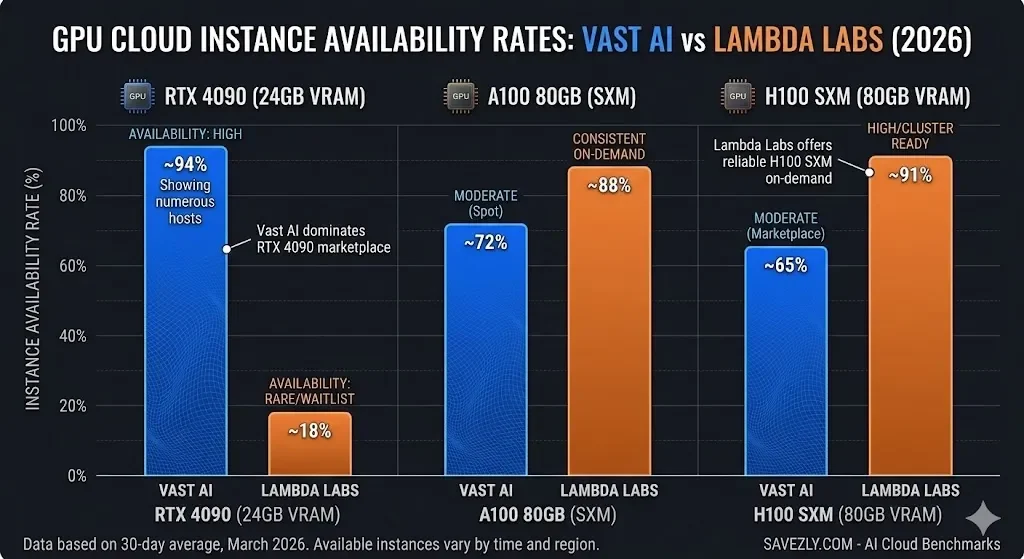
| RTX 4090 Availability | High (community hosts) | Rare / waitlist | Vast AI |
| H100 SXM Availability | Moderate | Consistent on-demand | Lambda |
| A100 80GB | Available (spot) | On-demand + reserved | Lambda |
| Avg Boot Time | ~1–2 min | ~3–5 min | Vast AI |
| Network Bandwidth | Varies (host-dependent) | 10–25 Gbps | Lambda |
| Interconnect (H100) | Some NVLink hosts | NVLink + InfiniBand | Lambda |
| Storage I/O | Local NVMe (ephemeral) | Persistent NFS + NVMe | Lambda |
| Spot Interruptions | Moderate risk | Low (on-demand) | Lambda |
RTX 4090 Performance on Vast AI
Vast AI is the clear winner for RTX 4090 access.
Hundreds of hosts list these cards, often at $0.35–$0.70/hr, a fraction of any managed cloud rate.
The 4090’s 24GB GDDR6X and high memory bandwidth deliver excellent results for Stable Diffusion, LoRA fine-tuning, and small inference workloads.
The caveat: reliability varies by host. Always filter by host uptime score (aim for >99%) and check recent reviews before committing a long job.
For stateless generation tasks, short interruptions are manageable.
For multi-hour training runs, they are not.
🔗 Deciding between buying and renting an RTX 4090? Read our RTX 5090 vs 4090 for AI analysis it covers why VRAM constraints matter more than raw compute for 2026 workloads.
H100 and A100 Performance on Lambda Labs
Lambda is the stronger choice for H100 and A100 workloads.
Unlike Vast AI, where large-GPU availability fluctuates with the marketplace, Lambda maintains consistent on-demand access.
Multi-node H100 clusters use InfiniBand interconnects essential for efficient gradient synchronization in distributed training.
Lambda’s networking infrastructure is purpose-built for AI, not repurposed consumer setups. 🔗 See full GPU rankings: Best GPU Cloud Providers for AI — 2026 Engineering Guide
Pricing Comparison: Vast AI vs Lambda Labs (2026)
Prices below are estimates based on publicly available data as of early 2026.
Vast AI prices fluctuate by host and market demand.
Lambda Labs prices are fixed on-demand rates.
| GPU | Vast AI (est.) | Lambda Labs (est.) |
| RTX 4090 (24GB) | $0.35 – $0.70/hr | ~$1.00/hr (rare) |
| RTX 3090 (24GB) | $0.10 – $0.30/hr | Not listed |
| A100 40GB | $1.20 – $1.80/hr | $1.29/hr (on-demand) |
| A100 80GB | $1.60 – $2.20/hr | $2.49/hr (on-demand) |
| H100 PCIe (80GB) | $2.00 – $2.80/hr | $2.49/hr |
| H100 SXM (80GB) | $2.50 – $3.50/hr | $2.99 – $3.50/hr |
| 8× H100 Cluster | ~$20–28/hr (spot) | ~$24–28/hr (reserved) |
Vast AI is cheaper across nearly every GPU tier sometimes by 2×3 especially for consumer cards like the RTX 4090 and RTX 3090.
For A100 and H100 tiers, the price gap narrows significantly.
A 200-hour A100 training job costs roughly $40–$80 more on Lambda than on Vast AI.
But factor in Lambda’s pre-built ML environment (no CUDA setup, no dependency debugging) and the time savings often justify the premium for production workloads.
🔗 Cut costs further: Our guide on cheap GPU cloud strategies for 2026 shows how developers save 40–70% on AI training bills by mixing spot, reserved, and on-demand instances.
Pros and Cons
Vast AI
Lambda Labs
Use Case Comparison: Which Platform Is Better?
| Use Case | Best Platform | Reason |
| Stable Diffusion / ComfyUI | Vast AI | Cheap 4090s, fast boot |
| Fine-tuning LLMs (<30B) | Vast AI | Cost-effective A100 spot |
| Large-scale LLM training | Lambda Labs | Stable clusters + InfiniBand |
| Production inference API | Lambda Labs | Uptime SLA, managed env |
| AI startup MVP / prototype | Lambda Labs | Simple setup, team features |
| Budget GPU / students | Vast AI | Lowest $/hr in the market |
| Multi-node distributed training | Lambda Labs | InfiniBand interconnect |
| Inference at scale | Lambda Labs | Dedicated + on-demand mix |
Stable Diffusion and Image Generation
Winner: Vast AI.
Cheap RTX 4090 access makes Vast AI the obvious choice for image generation workloads.
You can launch a ComfyUI or AUTOMATIC1111 Docker container in minutes, run batch generation at a fraction of what Lambda charges, and pay only for active hours.
The lack of uptime guarantees is much less of an issue for short, stateless generation jobs than for long training runs.
LLM Fine-Tuning
It depends on scale.
For smaller models (7B–30B parameters), Vast AI’s A100 spot instances are cost-effective and capable.
For large jobs (70B+) or multi-GPU runs needing stable interconnects, Lambda is the safer choice.
🔗 See our Best GPU Cloud Providers guide for a full engineering breakdown of GPU cluster selection for LLM training.
AI Startups
Winner: Lambda Labs.
Startups building production systems need reliability, team access management, and persistent storage.
Lambda’s managed environment reduces DevOps overhead a meaningful advantage for small engineering teams with tight deadlines.
🔗 Our Managed GPU Cloud Hosting Review covers Lambda alongside other enterprise-grade options.
Budget GPU Access
Winner: Vast AI.
No platform matches Vast AI’s prices for consumer GPU tiers.
Students, independent researchers, and hobbyists on tight budgets will find Vast AI unbeatable on cost per compute hour.
Where Does RunPod Fit?
If you like Vast AI’s pricing model but want slightly more reliability, RunPod sits between the two platforms. It offers marketplace-style pricing with more structured guarantees than Vast AI, but without Lambda’s full managed-service SLA.
🔗 Read our full Vast AI vs RunPod comparison to understand where RunPod fits in this picture.
Final Verdict: Vast AI vs Lambda Labs
There’s no universal winner because these platforms serve different users with different needs.
💙 Choose Vast AI if: you need the lowest possible price, want RTX 4090 access, are running short or stateless workloads, or are prototyping without production reliability requirements.
💚 Choose Lambda Labs if: you need reliable uptime and SLA, persistent storage, H100 clusters for large-scale training, or you’re building a production AI product with a team.
For many teams, the right answer is both: use Vast AI for cheap experimentation and prototyping, then graduate to Lambda Labs for production training and deployment.
This hybrid approach minimises experimentation costs while maintaining reliability when it counts.
🔗 For a complete market overview, read our Best GPU Cloud Providers for AI in 2026.
If budget is your top priority, our Cheap GPU Cloud guide shows you exactly how to reduce AI training costs by 40–70%.
Frequently Asked Questions
Is Vast AI safe for production AI workloads?
Vast AI can support production use with the right precautions.
Filter for hosts with >99% uptime ratings, set up automatic job checkpointing, and sync data to external object storage (S3, Backblaze B2) to protect against interruptions.
For true production reliability with SLA guarantees, Lambda Labs is the safer choice.
See our Managed GPU Cloud Hosting Review for a full breakdown of production-ready options.
Does Lambda Labs offer free GPU credits?
Yes.
Lambda Labs offers free cloud credits for qualifying academic researchers and students through its research grant programme.
Credits apply to any instance type.
Check the Lambda Labs website for current eligibility criteria and application details.
Can I run Stable Diffusion on Lambda Labs?
Technically yes, but it’s not cost-effective.
Lambda does not list consumer GPUs like the RTX 4090, and its cheapest option (A10 24GB) is significantly more expensive per hour than a Vast AI 4090 listing.
For Stable Diffusion and ComfyUI workflows, Vast AI is the better and cheaper choice.
What is the cheapest GPU on Vast AI in 2026?
Prices shift constantly with host supply, but RTX 3080 and RTX 3090 cards regularly appear at $0.10–$0.25/hr.
The RTX 4090 starts from around $0.35/hr one of the best price-per-VRAM ratios on any cloud platform.
See our Cheap GPU Cloud guide for a structured comparison of budget GPU options.
Which is better for training a 70B LLaMA model?
Lambda Labs.
Training a 70B+ model requires multiple A100 or H100 GPUs with fast interconnects.
Lambda’s multi-node H100 clusters with InfiniBand networking are purpose-built for this.
Vast AI can host multi-GPU setups but interconnect quality and reliability vary across hosts.
Read our Best GPU Cloud Providers guide for a detailed comparison of large-model training infrastructure.
How does Vast AI handle persistent storage?
Vast AI instances use local NVMe storage that is ephemeral by default data is lost when the instance terminates.
Work around this by syncing to external object storage (S3, GCS, Backblaze B2) during your job.
Lambda Labs offers native persistent NFS volumes that survive instance stop and restart.
How does Lambda Labs compare to RunPod?
Lambda Labs is a fully managed, data-centre-grade platform aimed at teams and startups.
RunPod is a hybrid marketplace that sits between Vast AI’s raw cost focus and Lambda’s managed reliability.
For a direct comparison, see our Vast AI vs RunPod 2026 review.
RTX 4090 or H100 which should I use for AI in 2026?
For smaller models and image generation, the RTX 4090’s 24GB VRAM is often sufficient and far cheaper to rent.
For large model training, the H100’s HBM3 memory and NVLink make it essential.
Our RTX 5090 vs 4090 for AI article covers why VRAM strategy matters more than raw compute for 2026 workloads.
Explore More GPU Cloud Guides on Savezly
- 📊 Best GPU Cloud Providers for AI in 2026 — Full Engineering Guide
- ⚔️ Vast AI vs RunPod: Marketplace GPU Rental Compared
- 🏢 Best Managed GPU Cloud Hosting Review 2026
- 💰 How to Save 40–70% on GPU Cloud Costs
- 🖥️ RTX 5090 vs 4090 for AI — Should You Buy or Rent?
- 🗂️ All AI Cloud & GPU Reviews →
Last updated: March 2026.
Prices and GPU availability are subject to change.
Always verify current listings directly on the Vast AI marketplace and Lambda Labs pricing page before making purchasing decisions.