
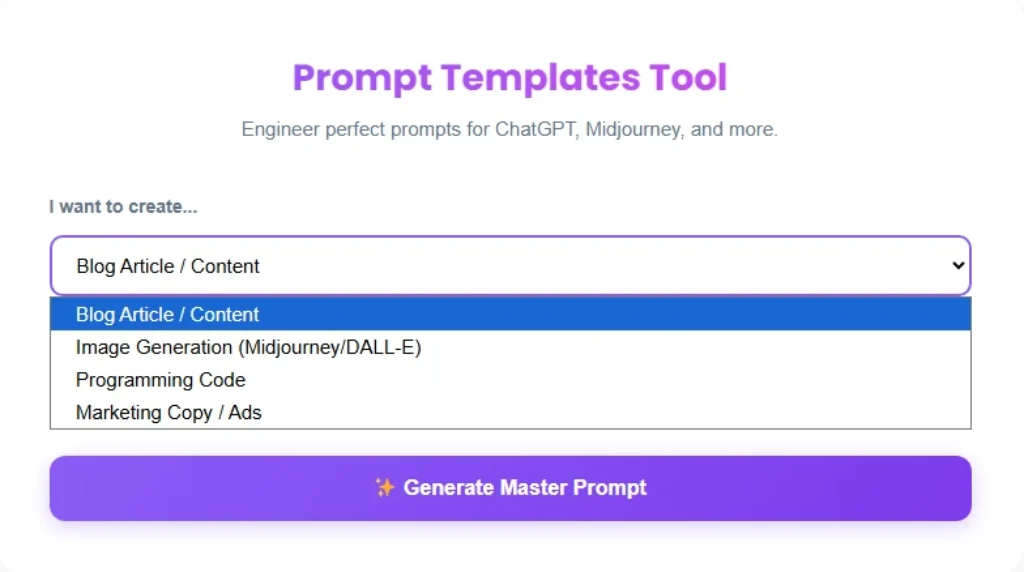
Prompt Templates Tool
Engineer perfect prompts for ChatGPT, Midjourney, and more.
How to Use the Prompt Templates Tool
You open ChatGPT.
You type something like “write me a blog post.”
The result is bland, generic, and nothing like what you had in mind.
Sound familiar?
The problem isn’t the AI it’s the prompt.
Bad input = bad output.
That’s exactly the problem the Savezly Prompt Templates Tool is built to fix.
It turns your rough idea into a structured, expert-level instruction that gets AI to actually deliver what you want on the first try.
No prompt engineering experience needed.
No paid subscription.
Just paste your idea, click generate, and copy a professional-grade prompt in seconds.
Table of Contents
What is the Prompt Templates Tool?
The Prompt Templates Tool by Savezly is a free, browser-based AI prompt generator that transforms a basic topic or goal into a fully detailed, ready-to-use prompt.
You pick your goal category blog content, image generation, code, or marketing copy type your topic, and the tool engineers a professional prompt for you automatically.
It works with every major AI platform you already use:
- ChatGPT (GPT-4o)
- Claude (3.5 / Sonnet)
- Google Gemini
- Midjourney
- DALL-E
Think of it this way: instead of telling a chef “make me something good,” you hand them a full recipe card ingredients, technique, and the exact dish you want.
That’s what this tool does for AI.
Why You Need Prompt Templates
Most people use AI at around 30% of its potential because they don’t know how to ask.
Here’s what proper AI prompt templates change:
Stop rewriting the same prompts over and over.
Generate a polished prompt in seconds instead of spending 20 minutes on trial and error.
Fix the blank page problem.
You know what you want but can’t phrase it for an AI.
The tool bridges that gap instantly.
Get expert-level results from day one.
The tool automatically adds persona assignment, context, and constraints things most users never think to include.
Works for any content type. Blog articles, ad copy, image prompts, code one tool covers it all.
No learning curve.
You don’t need to learn prompt engineering.
Key Features
| Feature | What It Does |
| Persona Assignment | Automatically tells the AI to act as a professional expert (e.g., “Expert Marketer,” “Senior Developer”) |
| Context Optimization | Fills in background details that bridge the gap between your rough idea and a detailed brief |
| Constraint Setting | Defines clear do’s and don’ts inside the prompt to prevent hallucinations and vague outputs |
| Multi-Model Compatibility | Optimized for text LLMs (ChatGPT, Claude, Gemini) and visual AI (Midjourney, DALL-E) |
| 4 Goal Categories | Blog/Content, Image Generation, Programming Code, Marketing Copy |
| One-Click Copy | Instantly copies your generated prompt — zero friction |
| 100% Free | No account, no paywall, no usage limits |
How to Use the Prompt Templates Tool (Step-by-Step)
Using the tool takes less than 60 seconds.
Here’s exactly how:
Step 1: Select Your Goal Category
Use the dropdown to choose what type of content you’re creating:
- Blog Article / Content
- Image Generation (Midjourney / DALL-E)
- Programming Code
- Marketing Copy / Ads
This tells the tool which prompt structure and format to apply.
Step 2: Enter Your Topic or Goal
Type your main idea into the “Main Topic or Goal”
field Keep it simple and direct. Examples:
- “email marketing campaign for a SaaS startup”
- “minimalist homepage UI in React”
- “futuristic city skyline at night”
The tool handles all the engineering from here.
Step 3: Click “✨ Generate Master Prompt”
Hit the button. Within seconds, a fully structured, expert-level prompt appears in the output box.
It includes a defined role, context, format instructions, and constraints all automatically.
Step 4: Copy and Paste into Your AI Tool
Click “Copy” and paste the generated prompt directly into ChatGPT, Claude, Gemini, or Midjourney.
You’ll immediately notice the quality difference in the output.
Step 5: Refine if Needed
If the AI result needs a small adjustment, go back to the Prompt Templates Tool, add more specific details to your input, and regenerate. Iterative prompting is the fastest path to perfection.
Examples of Prompts You Can Generate
Here are real-world examples of what this ChatGPT prompt template generator produces across different use cases:
📝 Blog & SEO Content
Input: “10 best AI tools for content creators”
What the tool generates: A structured content brief with SEO-optimized H2 suggestions, target audience definition, tone of voice, and keyword placement instructions ready to drop into ChatGPT or Claude for a full draft.
📣 Marketing Copy
Input: “Facebook ad for an online fitness course”
What the tool generates: A conversion-focused ad brief with hook, pain point identification, call-to-action phrasing, and character limit constraints baked in.
🖼️ Image Generation (Midjourney / DALL-E)
Input: “futuristic cyberpunk city at night”
What the tool generates: A detailed Midjourney prompt including lighting conditions, camera angle, art style references, color palette, and aspect ratio are all the parameters that turn a vague idea into a stunning image.
💻 Programming Code
Input: “Build a REST API in Node.js”
What the tool generates: A technical prompt specifying stack, folder structure, error handling patterns, and output format so the AI writes production-quality code, not just a basic skeleton.
🎬 Video Scripts
Input: “YouTube video on passive income ideas”
What the tool generates: A script prompt with hook, narrative arc, timestamps, and engagement-optimized language.
🏷️ Brand Voice & Slogans
Input: “Brand voice for a sustainable fashion startup” What the tool generates: A tone-of-voice brief your AI can use consistently.
Benefits Table
| Feature | What It Does | Benefit for You |
| Persona Assignment | Assigns AI a professional expert role | More authoritative, focused outputs |
| Context Optimization | Adds background detail to your idea | AI understands the full picture, not just keywords |
| Constraint Setting | Defines what AI should and shouldn’t do | Fewer hallucinations, less off-topic rambling |
| 4 Goal Categories | Blog, Image, Code, Marketing prompts | Tailored prompt structure for every task |
| Multi-Model Support | Works with ChatGPT, Claude, Midjourney, DALL-E | One tool across all your AI platforms |
| One-Click Copy | Instantly copies the generated prompt | Zero formatting headaches, zero friction |
| Completely Free | No login, no limits, no paywalls | Use it unlimited times, every single day |
Pro Tips for Getting the Best Results
Be specific with your input.
The more detail you give the tool, the more detailed the prompt it generates.
“email newsletter for a coffee subscription brand targeting millennials” will outperform “email newsletter” every time.
Use the “Act As” output.
The tool automatically assigns a persona but you can build on it.
If the output says “Act as a Senior SEO Specialist,” add your specific industry context in the next iteration.
Iterative prompting works.
Don’t expect perfection on the first run.
Generate a prompt, use it in ChatGPT, see what’s missing, and regenerate with more constraints.
Combine with other Savezly tools.
Use the YouTube Tag Generator to find high-CTR keywords for your AI-written video content, the Sitemap Generator to keep your site indexed as you publish more, and the Robots.txt Generator to control how search engines crawl your AI-assisted pages.
Frequently Asked Questions
What is a prompt template?
A prompt template is a structured, pre-formatted instruction designed to get better results from AI tools like ChatGPT, Claude, or Midjourney.
Instead of typing a vague request, a template includes a defined role, context, constraints, and output format.
The result: AI understands exactly what you want and delivers it.
Is the Prompt Templates Tool free?
Yes completely free.
No account to create, no subscription to buy, and no usage limits.
It’s part of Savezly’s free AI tool suite. Use it as many times as you need, for any project. Browse all available tools at Savezly’s Free AI Tools Hub.
Can I use the generated prompts with ChatGPT or Claude?
Absolutely.
The tool generates prompts optimized for all major text-based LLMs including ChatGPT (GPT-4o), Claude 3.5, and Gemini 1.5 Pro.
It also generates visual prompts for Midjourney and DALL-E.
Copy the output and paste it directly into whichever platform you use.
Who should use this tool?
Anyone who uses AI tools regularly will benefit but it’s especially valuable for:
- Content creators & bloggers who want consistently high-quality AI drafts
- Marketers & copywriters running campaigns across multiple channels
- Developers generating boilerplate code or technical documentation
- Designers crafting detailed prompts for Midjourney or DALL-E
- Small business owners who want better AI output without spending hours on tweaking
Why use a prompt generator instead of just typing a question?
Simple questions produce generic AI answers.
A properly engineered prompt adds persona, context, format requirements, and constraints all the elements that push AI output from “okay” to “professional.”
The Prompt Templates Tool handles all of this automatically, so you get expert-level results without learning prompt engineering yourself.
Does it work for Midjourney image prompts?
Yes.
Select the “Image Generation (Midjourney/DALL-E)” category, enter your visual concept, and the tool generates a detailed image prompt, including lighting, camera angle, artistic style, mood, and quality parameters perfect for getting consistently stunning visuals.
Start Generating Better Prompts Right Now
You’ve seen what the Prompt Templates Tool can do.
It’s free, instant, and takes less than 60 seconds to use.
No sign-up.
No learning curve.
Just better AI results from this moment forward.
👉Try the Prompt Templates Tool — It’s Free
Want to do more with your workflow? Explore all free tools at Savezly’s Free AI Tools Hub — including the YouTube Tag Generator, JSON Formatter, QR Code Generator, and Word Counter.

